
From thousands of buried documents to answers employees can trust
We built an AI-powered knowledge platform where teams ask questions in plain language and get answers grounded in their company's own documents: cited, confidence-scored, and scoped to exactly what each person is allowed to see.
Book a Discovery CallInside the platform
A short walkthrough of the AI Assistant, citation verification, document ingestion, organization, permissions, and grounded fallback behavior.
Read video transcript
Your company probably already wrote the answer. The problem is finding it. We built an AI knowledge platform that turns thousands of internal documents into something your team can actually ask.
Ask a question in plain language. It searches only the documents you're allowed to access, then answers with the steps, the sources, and a confidence score. Click a citation to verify the answer against the original document.
Adding knowledge is simple: upload documents, and they're processed and indexed automatically. If they're unorganized, the AI proposes a folder structure. You review, and apply.
Spaces keep sensitive knowledge separated between teams, and roles control exactly who can access what. And when the documents don't contain the answer, it doesn't guess.
Every answer can be reviewed and corrected, a feedback loop that improves the knowledge base over time. From buried documents to answers your team can actually trust. Built by Dorio.
Answers link back to the source passages they came from
Confidence score attached to every AI-generated answer
Parsed, chunked, and indexed automatically in the background
Permissions decide which documents each person can ask about
System Context
Next.js + React (TypeScript)
FastAPI (Python)
Google Gemini + RAG over a vector index
Custom AI knowledge platform
The knowledge existed. Finding it was the problem.
A growing organization had accumulated thousands of internal documents: policies, SOPs, contracts, manuals, onboarding guides. All of them were spread across folder trees that had stopped making sense years ago. The information employees needed was almost always written down somewhere. Nobody could find it.
So people stopped looking. They asked colleagues instead, and the same handful of experienced staff spent time every week answering questions that were already documented. Onboarding took longer than it needed to. And sensitive material sat unshared, because there was no safe way to control who could see it.
This wasn't a knowledge problem. It was a retrieval problem. The organization didn't need more documentation. It needed a way for every employee to ask a question and get the answer their documents already contained.
File-name search couldn't see inside PDFs. Folder conventions decayed with every reorg. And a generic chatbot was off the table: answers about policy and contracts have to be verifiably correct, not plausible.
What the organization was up against
Six compounding problems, one root cause: knowledge that couldn't be reached by the people who needed it.
Years of documents scattered across folders
Policies, SOPs, contracts, and manuals lived in nested folder trees that only a few long-tenured people could navigate.
The same questions asked again and again
Employees interrupted managers and senior staff for answers that already existed in writing. Nobody knew where to find them.
Slow onboarding for new staff
New hires spent their first weeks hunting for process documents instead of doing the job they were hired for.
Knowledge trapped inside PDFs
The answer was on page 47 of a handbook. Search stopped at the file name.
No permission-based knowledge access
Sharing HR or finance material meant sharing it with everyone, so it stayed locked away instead.
No way to trust an answer
Even when something turned up, there was no way to tell whether it was the current version, or the right document at all.
A knowledge platform, not a chatbot
We designed and built an AI-powered knowledge platform where employees ask questions the way they'd ask a colleague, and get answers assembled from the company's own documents. Answers cite the documents they came from, down to the page and quoted passage, and carry a confidence score so people know how much weight to put on them.
Just as importantly, the platform respects the organization's boundaries. Access control is applied before retrieval, so the AI can only read what the asker is allowed to read. Spaces keep HR answering from HR documents. And when the documents don't contain an answer, the assistant says exactly that.
The result is a single, trusted place where company knowledge is uploaded once, organized automatically, and drawn on every day. Not a folder graveyard nobody opens.
Everything an internal knowledge platform needs
Not a demo with a chat window. A complete product covering search, organization, governance, and administration.
AI Document Search
Search that reads inside your documents, not just file names. Available from a chat page or the global command bar.
Natural Language Questions
Employees ask in plain language: no query syntax, no tags, no training.
Citation-Backed Answers
Answers name their source documents, down to the page and section, with the supporting passage quoted.
Automatic Document Organization
Bulk uploads come back as a proposed folder structure ready for an admin to approve, and optional instructions steer what the AI proposes.
Role-Based Access
Granular permissions grouped by area, with default Admin and User roles plus unlimited custom roles.
Spaces for Department Isolation
HR, finance, or legal content lives in its own space, visible only to the roles and members you assign.
PDF & DOCX Processing
Drag-and-drop uploads, including very large files. Each one is split into chunks and processed in the background.
Conversation History
Past conversations are saved and can be reopened anytime. An answer found once stays found.
Suggested Questions
Admin-curated question starters plus AI-generated follow-ups guide people to what's worth asking.
Feedback Loop
Users rate answers; flagged ones land in an admin review queue, and corrections are reused for repeat questions.
Admin Dashboard
Documents, folders, users, and recent activity at a glance, with per-space analytics for deeper insight.
AI Token Usage
Consumption is metered against the company's plan, visible throughout the dashboard, with self-service top-ups.
From document to trusted answer
One pipeline handles everything between an uploaded file and a cited answer: no manual filing, tagging, or curation anywhere in it.
Upload documents
PDF and DOCX, even very large files
AI processes content
Parsed and split in the background
Knowledge index
Embeddings stored in a vector index
Employee asks
Plain-language question
Content retrieved
Only from permitted documents
Grounded answer
Generated from sources only
Sources & confidence
Linked sources and a 0–100 score
The platform, screen by screen
Six views of the system in use: the assistant employees live in, and the controls administrators run it with.
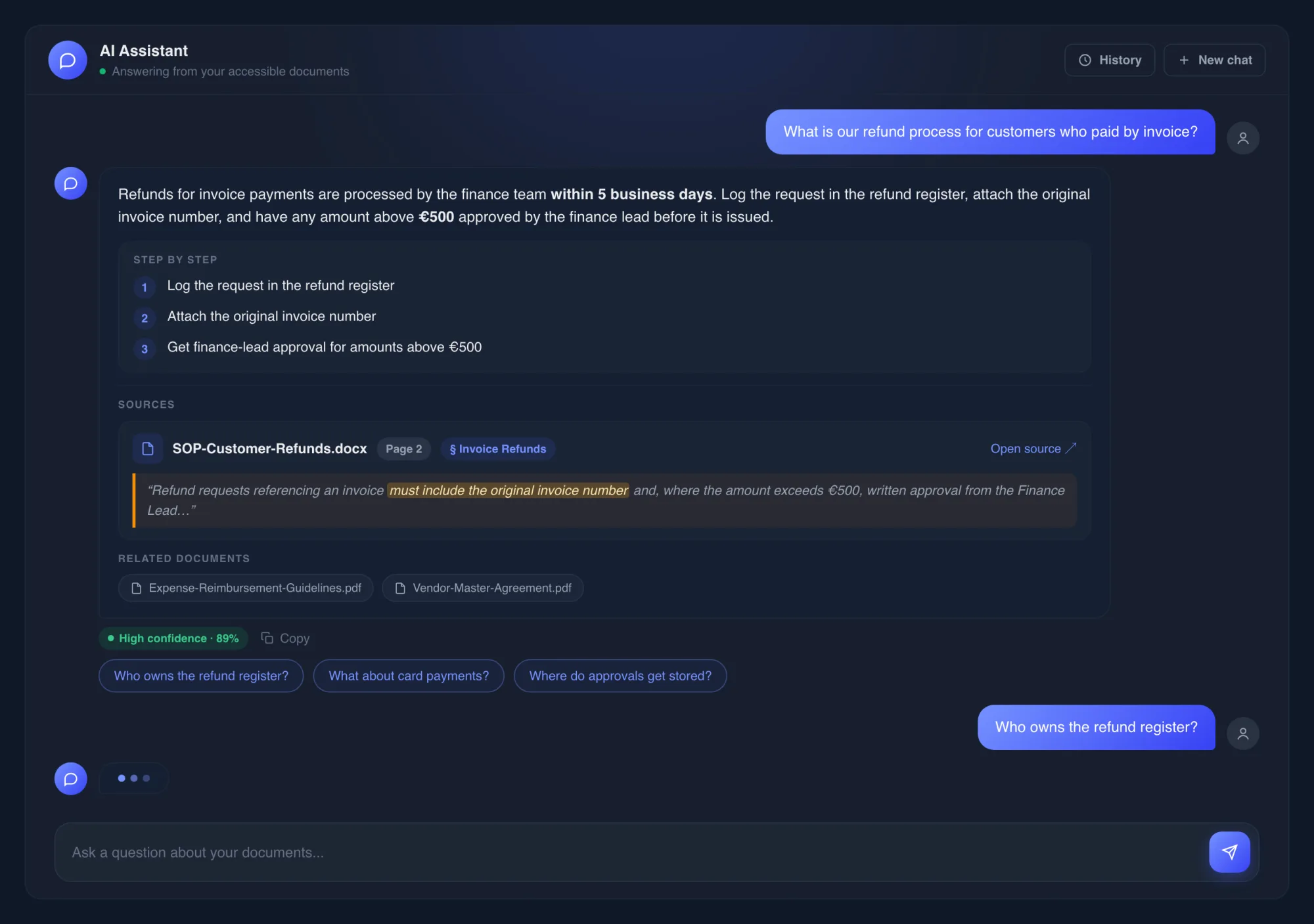
Ask in plain language. Get an answer you can verify.
The assistant answers only from documents the asker can access. Answers carry their citations (filename, page, and the quoted passage) alongside a confidence score and suggested follow-up questions.
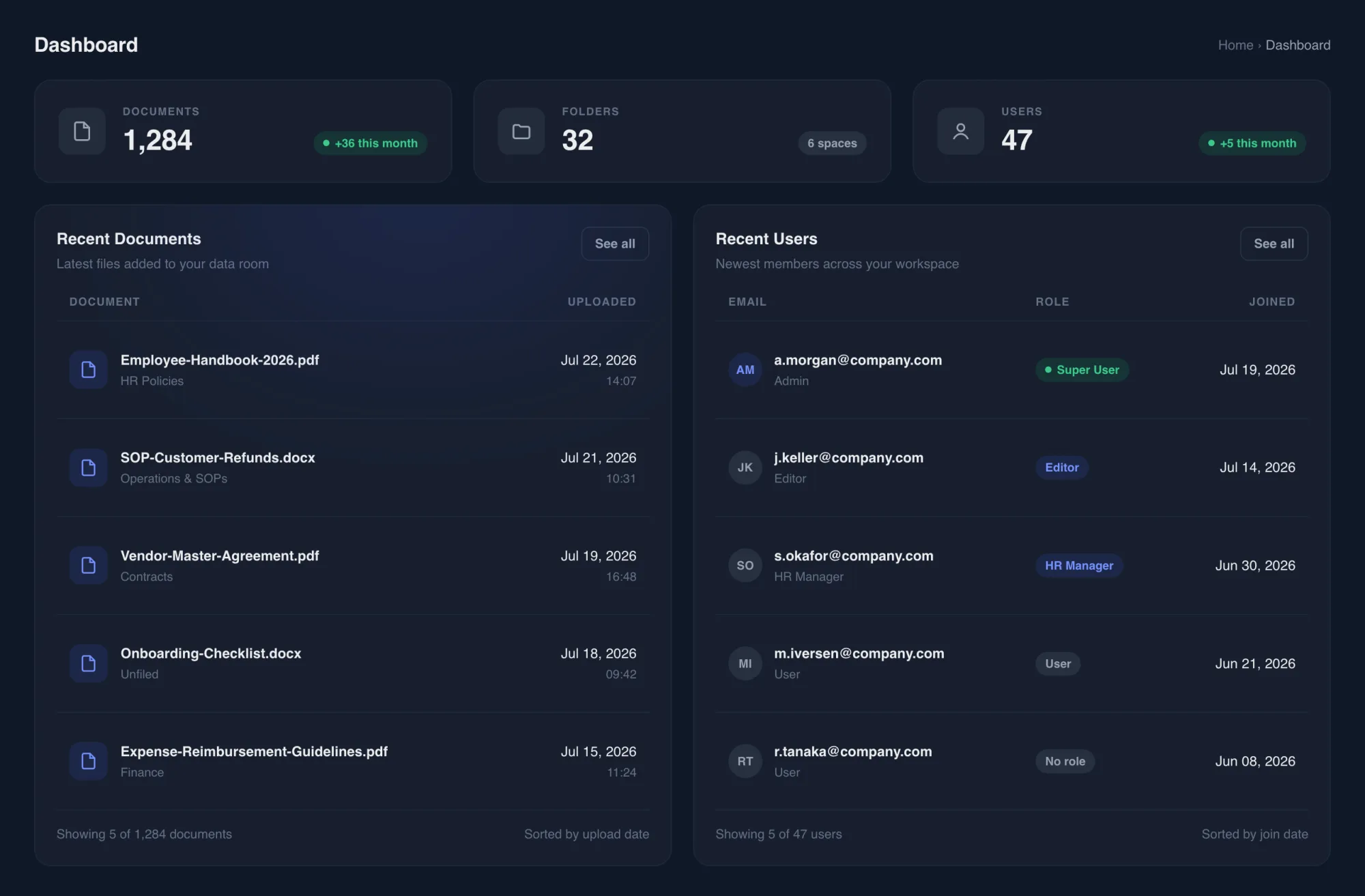
The state of your knowledge base at a glance
Administrators land on a live overview: total documents, folders, and users; the latest uploads with their folders; and the newest accounts with their roles. No digging through menus.
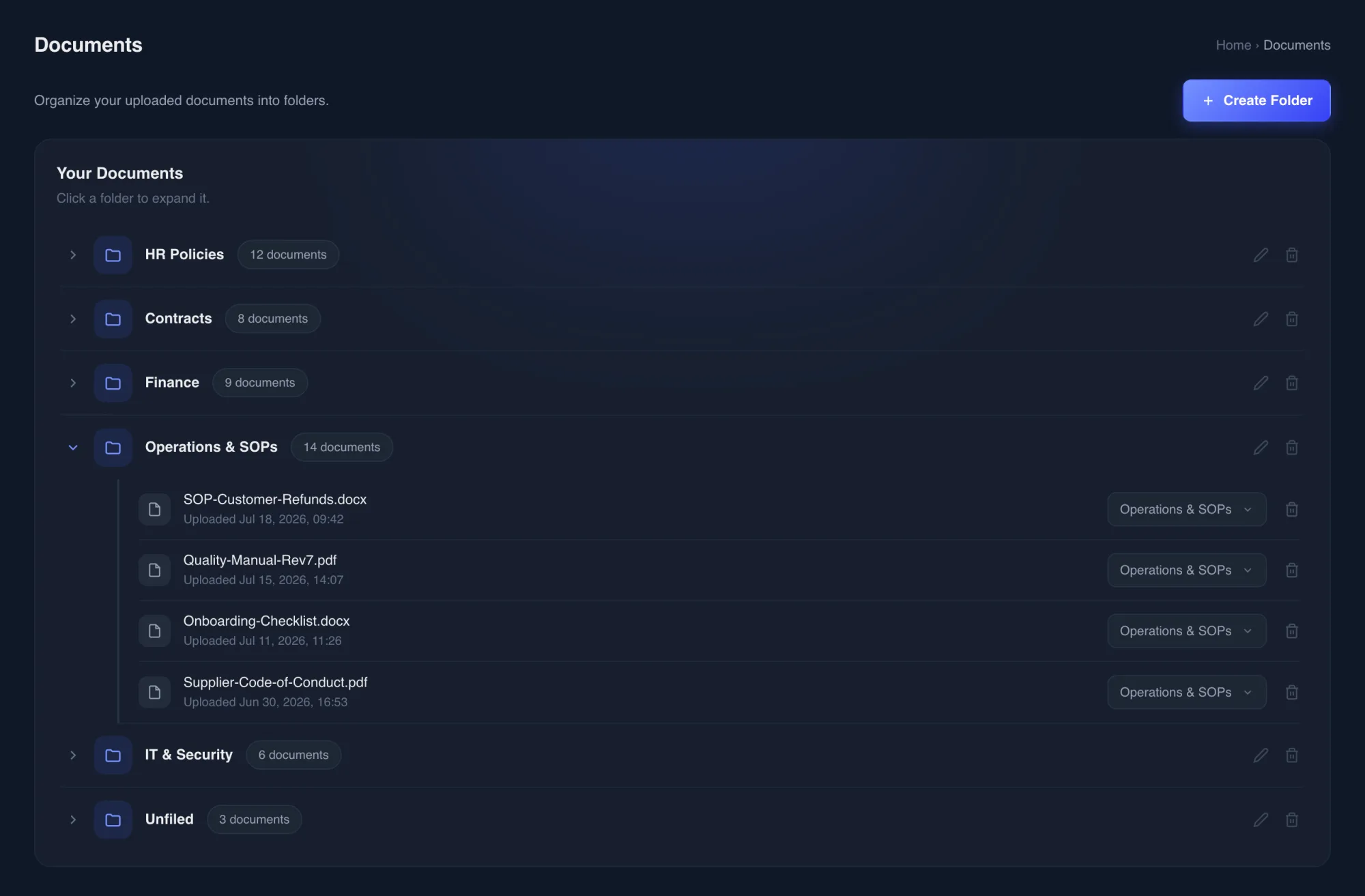
Every document organized, nothing lost
An expandable folder tree keeps the library navigable as it grows. Unsorted files wait in a built-in Unfiled area, and moving a document is a single dropdown. The index updates itself.
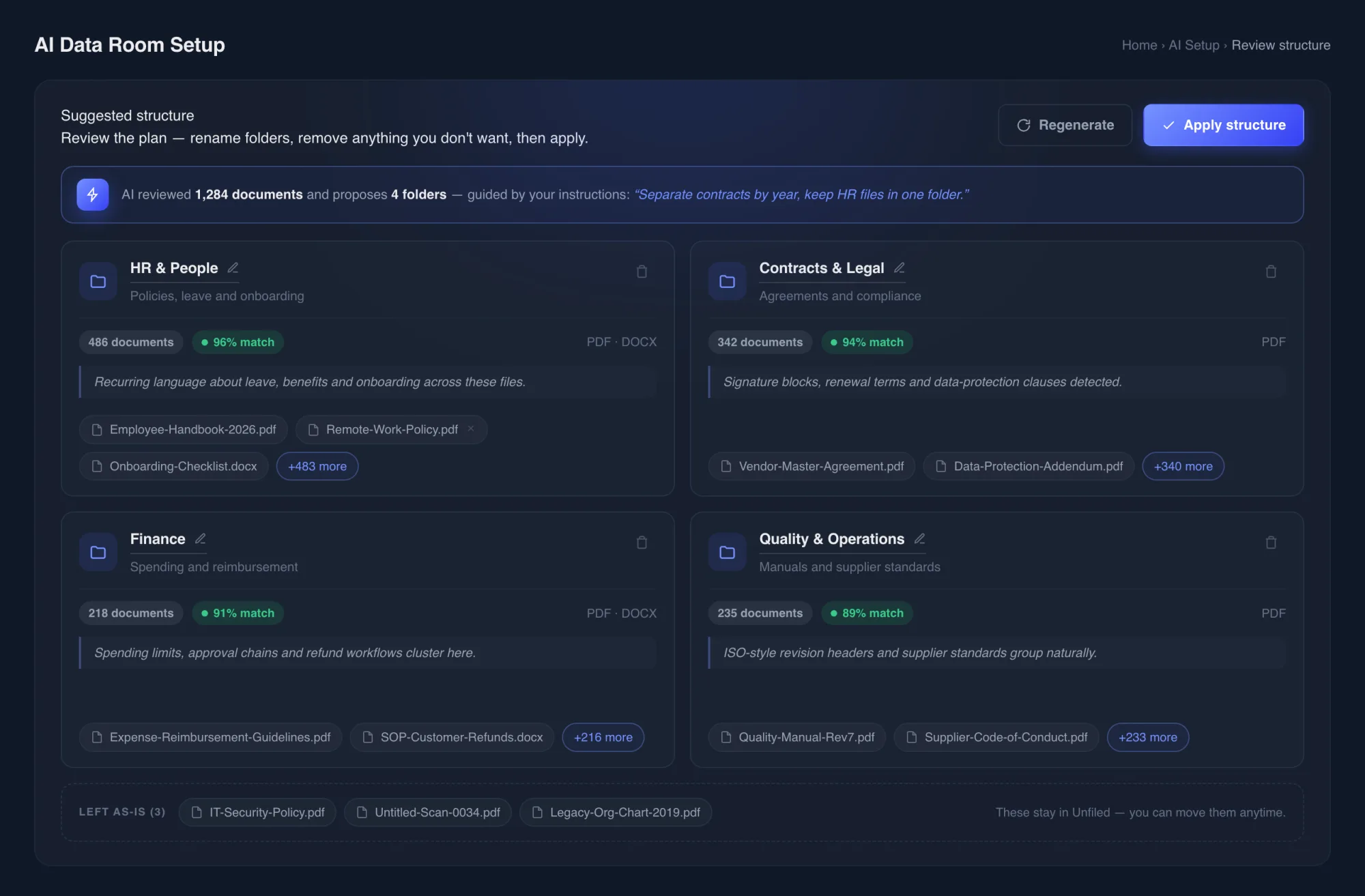
One click turns a pile of uploads into a filing system
After a bulk upload, the AI reviews every file and proposes a professional folder structure, guided by instructions like "separate contracts by year." Admins review the plan, adjust it, and apply it. Hours of manual sorting collapse into minutes.
Department knowledge stays with the department
An HR space is visible only to HR. Each space carries its own members, role grants, and analytics: questions asked, answer rate, average confidence. Teams can see how their knowledge is actually used.
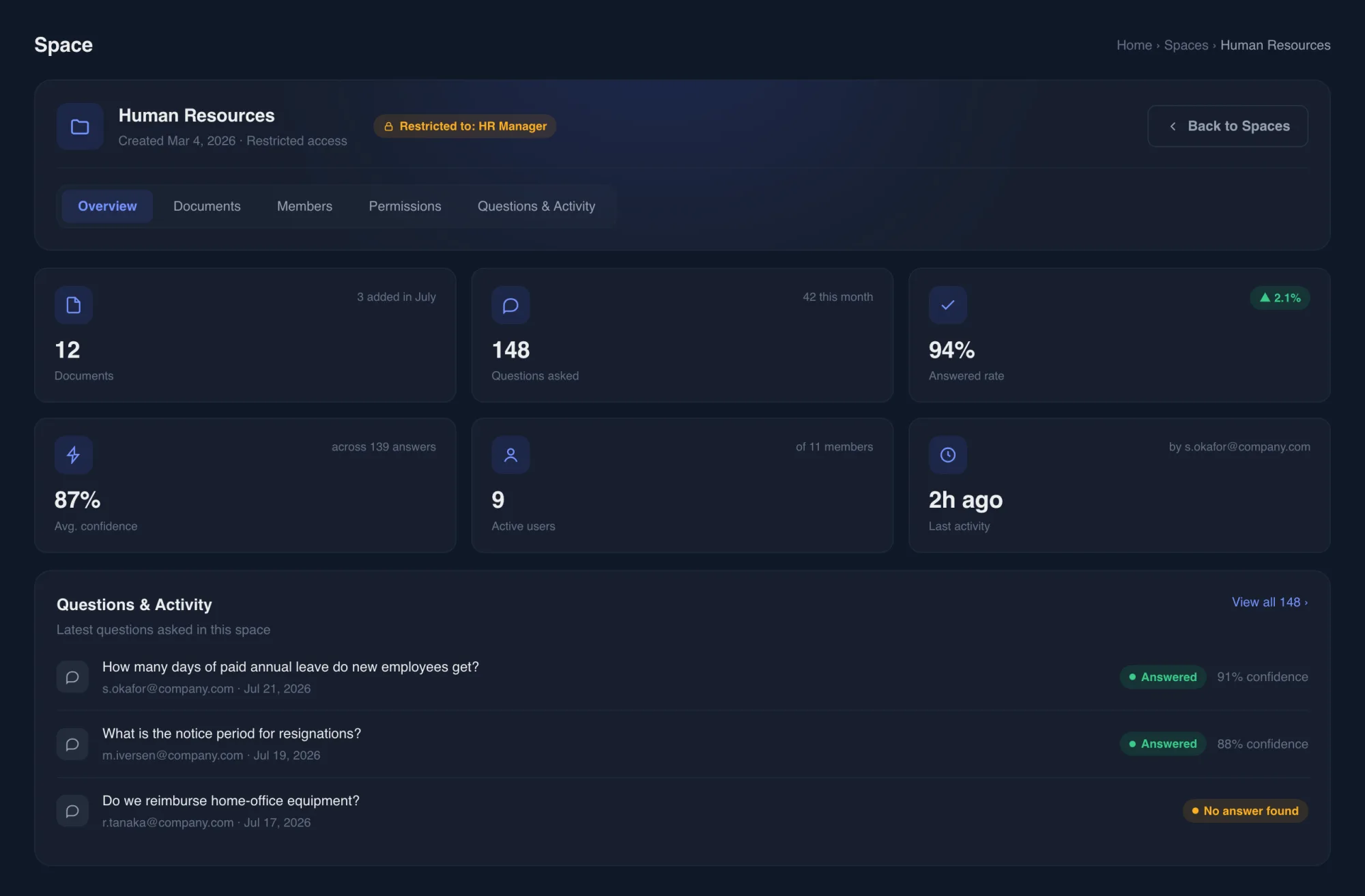
Fine-grained control over who sees what
Admins manage every account from one table: create users, assign roles, block or remove access. Custom roles bundle exact permissions, grouped by area, and changes apply immediately to everyone holding the role.
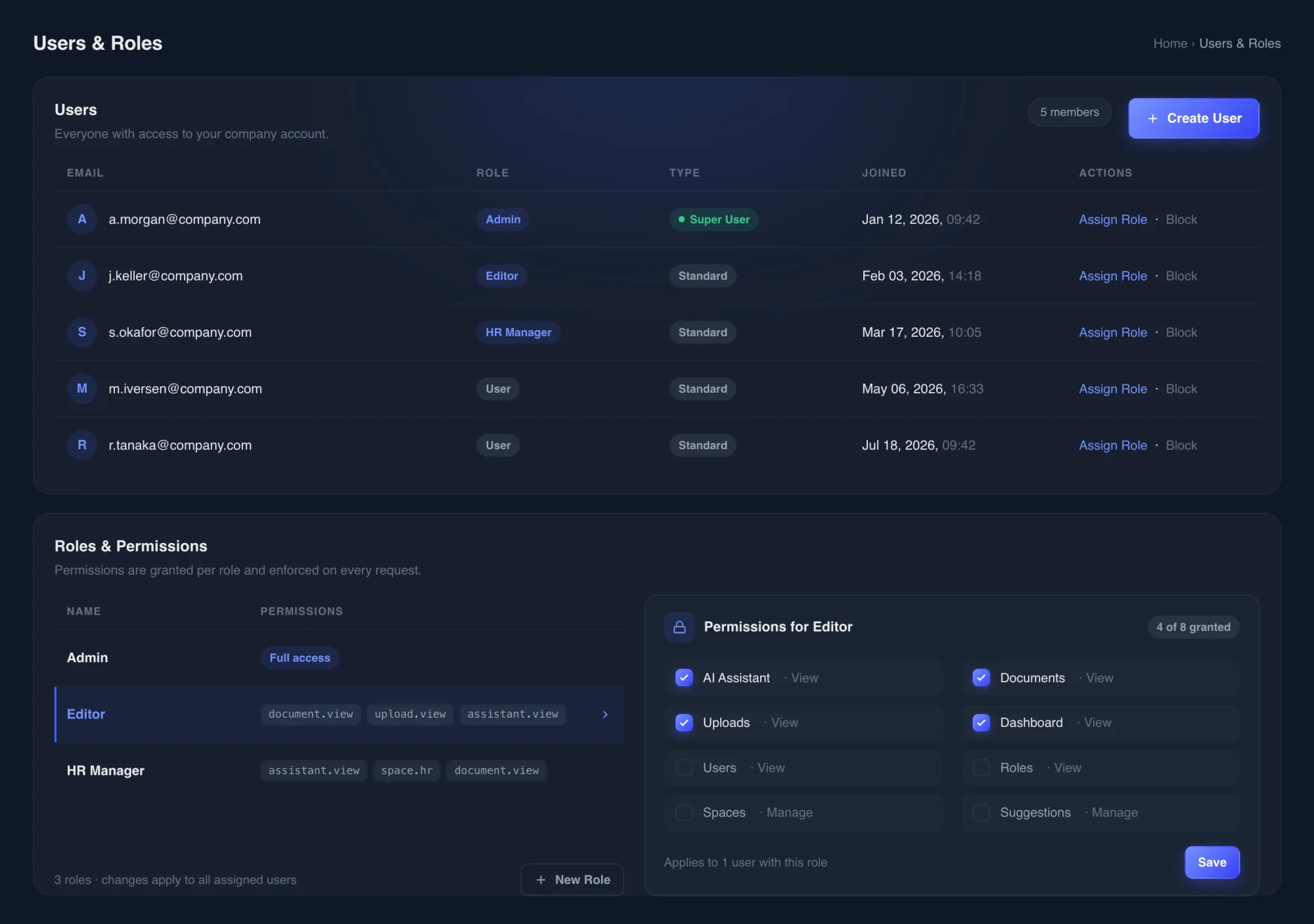
Designed so nobody sees an answer they shouldn't
An internal knowledge platform is only usable if it's safe to put real documents in. Access control isn't a feature here. It's the architecture.
Company-level isolation
Every account, document, and query is scoped to its own company and enforced on every request (AI retrieval included).
Role-based permissions
Fine-grained permission codes, grouped by area and enforced by the backend on every request, not hidden buttons in the UI.
Department Spaces
Spaces are private by default. A space with no assigned roles or members is visible to nobody but its owner and admins.
Source-only answers
Retrieval is filtered to the documents the asker is allowed to see before the AI ever reads a word. Access control happens first.
Sensitive values masked
Personal identifiers, banking details, salary figures, and medical information are automatically masked in generated answers.
No guessed answers
Quoted citations are verified against the actual document text, and when the documents don't contain an answer, the assistant says so instead of improvising.
Nine systems behind every answer
Wiring a text box to an AI model takes an afternoon. Making the answers trustworthy, safe, and billable takes real systems. Nine of them, working together:
- Authentication: JWT-based sessions with per-request account, company, and plan checks
- Permissions: a three-axis access model of platform admins, company admins, and fine-grained per-role permission codes
- Document processing: chunked uploads reassembled and parsed by background workers, so a 500-page manual doesn't block the UI
- Embedding pipeline: content split with overlap, embedded in batches, and retried automatically on rate limits
- Retrieval: permission-filtered vector search, with the allowlist computed before the query ever touches the index
- Citation verification: quoted passages are checked against the actual chunk text; a quote that can't be verified is dropped, not shown
- Feedback loop: flagged answers enter a review queue; corrections outrank the model when the question comes back
- Usage metering: token budgets checked before every AI call and real usage deducted after it, tied to Stripe billing
- Multi-tenancy: company-scoped data access on every query, with billing state changed only by verified payment webhooks
Less time searching. More time acting.
The platform changes the default behavior around company knowledge: instead of hunting through folders or interrupting a colleague, people ask, and get an answer they can check.
- Employees ask questions in natural language and get sourced answers in seconds
- New staff learn the ropes from the knowledge base instead of from senior people's calendars
- Administrators keep complete control over access at every level: company, space, role, and individual
- Knowledge becomes searchable instead of buried, and stays organized as it grows
The stack behind the platform
Proven, boring-in-the-best-way infrastructure around the AI core, chosen for reliability and maintainability, not novelty.
Next.js App Router, React, TypeScript, Tailwind CSS
FastAPI (Python), SQLAlchemy
MySQL + Chroma vector store
Google Gemini: embeddings & generation, LangGraph pipeline
JWT with role-based access control
Stripe: subscriptions & token top-ups
Chunked uploads, background ingestion workers
Docker, webhook-driven provisioning
If your team's answers are locked in documents nobody can find, this is the system that gets them out. End to end, from document ingestion to access control to citations people can check. We'll walk you through how it would work on your documents.
Book a Discovery CallInterested in building something similar?
Let's discuss your workflows, and where an AI system like this would remove the most friction.
Not ready for a call? Tell us what's broken →
- Fixed price before we start
- You speak directly with the builder
- If it's not worth doing, we'll tell you
No pitch. Just a clear answer.